

Does keyword research move the business metrics even today?
Every online search starts with a keyword.
Strong SEO optimization is the best investment for real, quantifiable results, despite companies seeking short and simple AI optimization tricks.
If you’re new to SEO, understanding the basics first makes keyword research much easier. Our Beginner SEO Guide explains how search engines rank content step by step.
With the use of smart blog SEO tools, keyword research—which is regarded as the foundation of SEO—can rapidly and efficiently increase your organic traffic.
So, yes, Keyword Research can impact the business metrics even today.
Table of Contents
What is Keyword Research?
Keyword research is the art of examining the right words or phrases that people use while searching for information, products, or services online.
Keyword Research is a true master of blending meticulous analysis and precise interpretations.
Why Keyword Research is So Crucial?
When you have decided to launch your site,
- The most basic thing is to find your target audience and prepare to attract them directly.
- Google’s search bar also requires you to input relevant keywords that will trigger your site, create more impressions, and clicks.
Only keyword research can help you achieve it seamlessly. Because Keyword research addresses,
⭐What does your audience want?
⭐What problems do they have?
⭐What solutions do you offer?
⭐How do you offer?
Keyword research is the pillar for any successful SEO strategy.
But finding keywords is only the first step. Those keywords also need to be mapped to the right pages, optimized naturally throughout the website, and supported by a broader SEO strategy.
If you want to turn keyword research into measurable organic growth, explore our SEO Services. We help businesses with keyword research, on-page SEO, technical SEO, local SEO, SEO audits, and ongoing optimization.

How to do Keyword Research for Blog Posts
Hundreds of potential sites appear every time you type in a query,
Proper keyword research lets you prioritize ranking opportunities and attracts more valuable traffic to your site.
Below is an explained primer on “How to Conduct Keyword Research Using Free Blog SEO Tools” on the market will definitely help keyword research for beginners to find the right keywords and create more successful online content.
Step 1: Brainstorming keywords and topics related to your blog
Generating relevant keyword ideas needs smart brainstorming, as this step enhances all your content, SEO, and ranking in SERPs.
Brainstorming incorporates the following steps.
🧠Understand what you want to focus on.
🧠Pick out your core terms and terms that are already driving traffic to your site.
🧠Find a starting point by asking “what if” questions.
🧠Research what your audience asks on social media platforms.
🧠Get help from SERPs- Enter the seed keywords into the search bar and get autocomplete predictions, “People Also Ask” boxes, and related search boxes.
Finally, organize and group related lists of words.
Step 2: Utilize Free Keyword Research Tools
Keyword research tools examine every detail of search trends and give you all the information on how many people are searching for the topic, how competitive it is, what other related things they are looking for, and find precise keywords and phrases that people enter into search engines.
🔌So, it is good to plug in smart blog SEO tools on top of what you have just brainstormed.
Below are some of the free and popular blog SEO tools that can help improve your blog’s SERPs and optimize your content.
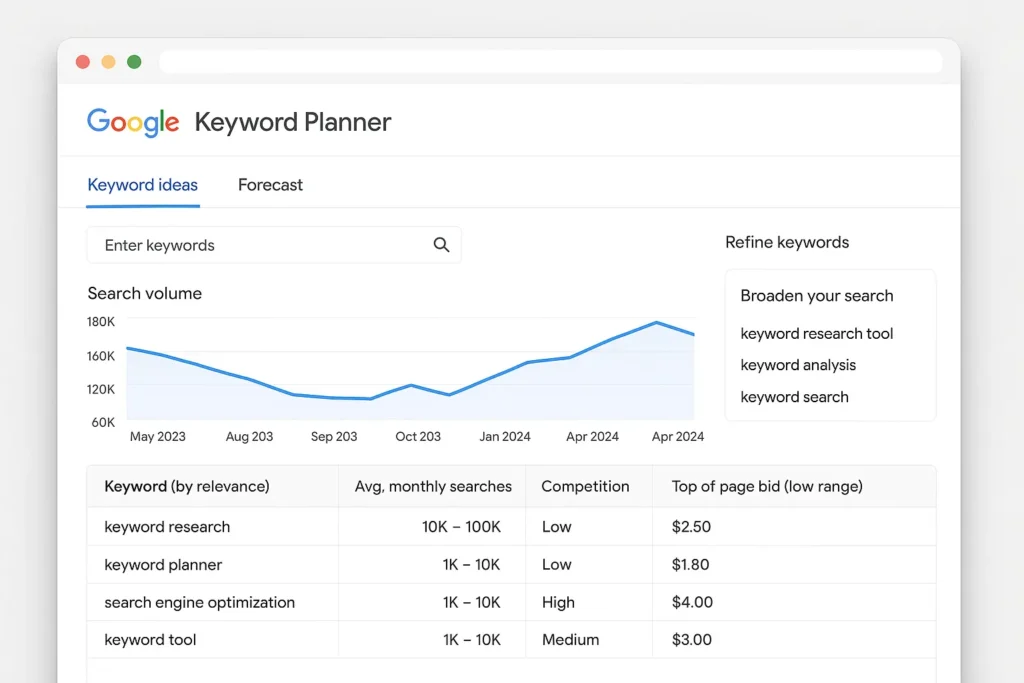
- Google keyword planner
The aim is to find relevant keywords and improve the site’s SEO and SERPs.
👉Log in to Google Keyword Planner.
👉Select “discover new keywords”
👉Enter your seed keywords
👉Analyses and displays sample output
This free tool, which is part of Google Ads, lets you generate efficient SEO and PPC campaigns by assisting you in finding fresh keyword ideas, search volume data, competition levels, and possible CPC estimates.
- Ubersuggest
This free tool provides backlink information, SEO analysis, content ideas, keyword suggestions, and SEO difficulty.
🧘Say you are blogging on yoga, health, and fitness, and want to find keywords related to your seed keyword “yoga for beginners”
👉Open the Ubersuggest tool.
👉Enter your seed keywords, “yoga for beginners”, “beginner yoga routine”, into the search bar
👉Click to review the keyword overview
👉Explore the ‘Keyword Ideas” Section
👉Analyse the metrics in the sample output
Sample Output
| keyword | Search volume | SEO difficulty | Paid difficulty | CPC |
| Yoga for beginners | 22000 | 45 | 35 | $1.20 |
| Beginner yoga routine | 9500 | 35 | 25 | $0.90 |
You may therefore examine and select the precise keywords to utilize in your blog using the aforementioned data.
3- Answer the public
This popular online tool discovers the “what, where, why, who, how” questions, comparison-based queries that people ask related to your keywords, and generates content ideas based on popular search queries.
The results are presented in a data visualization format.📊
This free version provides limited searches per day.
Example– For a seed keyword, say “Plant Care”🌿
👉Open “Answer the Public” tool
👉Enter the keyword “Plant Care”
👉Choose your location and language
👉Review the generated questions
❓ What is the best plant care?
❓How do I fertilize my dying plant?
Therefore, using the insights gathered above, bloggers can determine the most popular queries and topics searched by their target audience related to the focus keyword.

4- Google Search Console
Google offers this free tool, which enhances the functionality of your website, optimizes your content, keeps track of backlinks, fixes issues, and keeps your page visible in Google search results.
💡This tool’s output aids in measuring search traffic to the website and resolving problems.

5- Ahrefs
Use Ahrefs’ keyword research tool to find possible keywords, gauge the level of competition, and see how your website’s visibility is increasing. This is a complete tool for site audits, keyword research, backlink analysis, and content and SEO strategy improvement.
💡Additionally, this tool makes it possible to tweak keywords, check for SERP overviews, and monitor progress with Rank Tracker.

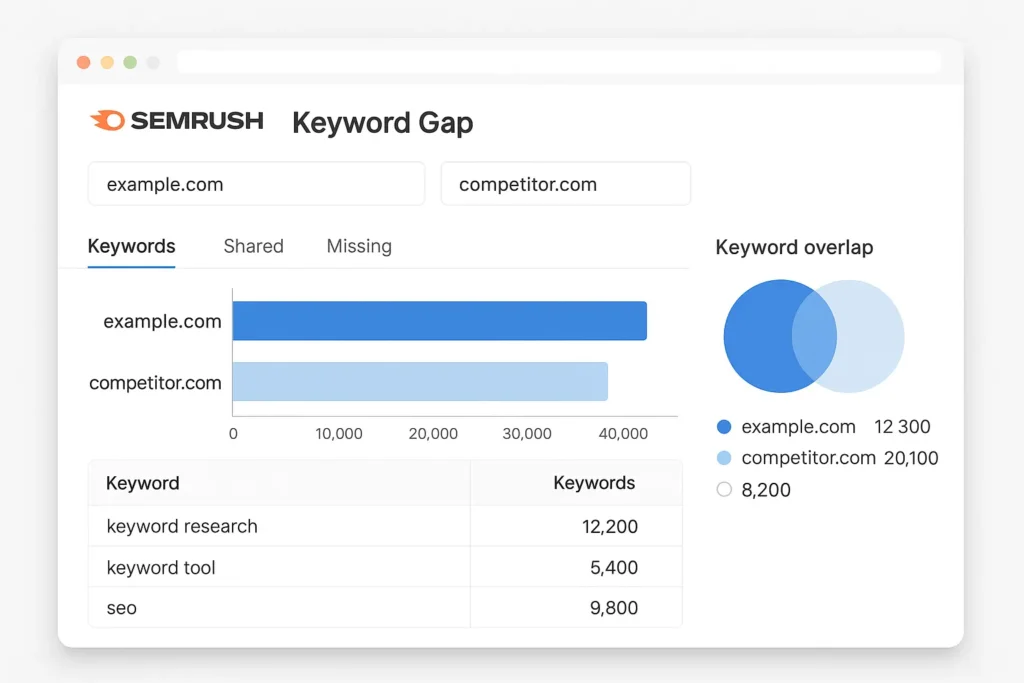
6- SEMrush
The keyword magic tool helps you find relevant keywords, evaluate their potential, and then optimise your content strategy by targeting the most effective keywords.
✔️Choose low-competition, high-volume keywords that complement your content.
✔️The keyword gap tool from SEMrush helps you identify pertinent keywords that you are overlooking.
✔️Drive immense traffic and conversions using this one-stop SEO tool.
💡Some other free SEO blog tools like Keyword Sheeter, Moz Pro, Screaming Frog SEO Spider, KWfinder, and Surfer SEO can help you identify SEO problems and match your content with the best SEO practices.
Once you find the right keywords, using the perfect blog structure for SEO helps Google and readers understand your content better.
Why You Need a Keyword Research Tool
- Rules out assumptions.
- Finds out those magic keywords and synonyms through data-driven insights.
- Finds relevant long-tail keywords.
- Accounts fully for competitive analysis.
- Identifies keywords that your competitors target.
📊 Keyword Research Tools for Beginners (Comparison Table)
| Tool | Best For | Free or Paid | Beginner Friendly |
|---|---|---|---|
| Google Search | Finding real queries | Free | ⭐⭐⭐⭐⭐ |
| Google Trends | Topic trends | Free | ⭐⭐⭐⭐ |
| Google Search Console | Existing keyword data | Free | ⭐⭐⭐ |
| Ubersuggest | Basic keyword ideas | Freemium | ⭐⭐⭐⭐ |
| Ahrefs / SEMrush | Advanced analysis | Paid | ⭐⭐ |
Step 1: Analyze and Prioritize your keywords
This step is done by properly assessing the search volume and keyword difficulty metrics.
👉Analyse search intent like the user’s reason for searching. The search intent can be informational (to learn), navigational(to find), transactional(to buy), and commercial(learning before buying)
👉Focus more on long-tail keywords as they are easier to rank for.
👉Research your competitor’s high-ranking pages, like how they have used keywords and what keywords they include in their descriptions.
👉Assign all of the focus keywords, synonyms, and search suggestions to each page of your website and calculate their chances of ranking in the top with these specific keywords.
Create more SEO opportunities by prioritizing the right and relevant keywords.
Step 2: Time to Organize the Focus Keywords
Now it’s time to organize the selected keywords into a spreadsheet.
📍Use your target keywords consistently across your website.
📍You may now identify the most effective keywords and write high-quality blogs.
📍 Optimize your blog posts and share them on all other platforms to rank high in SERPs.
📍See the approximate amount of organic traffic you may anticipate from Google searches for your themes using this set of keywords.
📍Troubleshoot the problems, keep optimising your posts, and publish the updated content.
Once you find the right keywords, using the perfect blog structure for SEO helps Google and readers understand your content better.
Step 3: Track Your Keyword Performance
Tracking keyword performance consistently helps you to adjust the strategy when your pages don’t rank for the chosen keywords.

.
Factors to Consider While Performing Keyword Research for Beginners
✔️Relevance: Do your keyword suggestions relate to the information on your website?
✔️ Ignoring keyword research.
✔️Stuffing keywords is strictly prohibited.
✔️Steer clear of overly competitive terms.
✔️Give up using low-ranking, high-volume keywords.
✔️Authority: Select keywords on which your website has some degree of credibility.
Keyword research also plays a key role in Answer Engine Optimization (AEO), especially when optimizing content for voice search and AI-generated answers.
❓ Frequently Asked Questions About Keyword Research for Blogs
Q1. What is keyword research in SEO?
Keyword research is the process of finding the exact words and phrases people type into Google so you can create content that matches their search intent.
Q2. Do beginners need paid keyword research tools?
No. Beginners can start with free tools like Google Search, Google Trends, and Search Console. Paid tools become useful only when you need deeper competition and volume data.
Q3. How many keywords should I target in one blog post?
One primary keyword and 3–5 related secondary keywords are enough for a single blog post.
Q4. What are long-tail keywords and why are they important?
Long-tail keywords are specific, low-competition phrases that are easier to rank for and usually bring more targeted traffic.
Q5. How often should I do keyword research?
You should do keyword research before writing every new blog post and review existing content every 3–6 months.
Final thoughts
The information on “How to do Keyword Research for Blog Posts Using Free Tools” above will undoubtedly assist you in finding keyword opportunities in your topics and will help you increase your blog traffic.
💡A proper keyword research process starts by selecting the necessary blog SEO tools.
Learning to do your keyword research the right way can definitely achieve more results with less work.
Use blog SEO tools smartly, and transform your blogs into a successful business!
For more such tips on digital marketing, keep following our blogs!
📌 Read this next on Digistir360
- 👉 Beginner: Perfect Blog Structure for SEO
- 👉 Advanced: What Is Answer Engine Optimization (AEO)?