
You want to start a YouTube channel but don’t know where to begin? Cameras, editing, content ideas, and publishing can feel overwhelming at first, but the truth is it’s quite simple.
⚠️ Most people overcomplicate YouTube and quit before their first 10 videos — don’t let that be you.
Most beginners struggle not because YouTube is hard, but because they don’t follow a clear system to start a YouTube channel the right way from day one.
👉 The difference between channels that grow and channels that stay at 0 views usually comes down to one thing: following a system.
👉 To understand the basics, check this digital marketing beginner guide:
You don’t need a full production setup or a big team to start a YouTube channel for business.
💡 In fact, some of the fastest-growing channels started with just a phone and a clear idea.
If your goal is to start a YouTube channel that actually brings business results, focus more on value and consistency than perfection.
👉 That’s exactly where a well-planned YouTube for business strategy makes all the difference.
Just create your account and start posting content that’s relevant to your audience. You can use free AI tools to make things easier for yourself or your in-house team if you have one.
Here are some free marketing tools for beginners you can start using today:
In this guide, we will walk you through a step-by-step guide on starting a YouTube for business in 3 steps.
Table of Contents
⏳ Don’t skip this — this quick summary alone can save you hours of confusion.
TL;DR: How to create a YouTube Channel for Business
YouTube is the world’s second-largest search engine after Google, with over 35 billion monthly searches and over 5 billion daily searches. That’s a great opportunity for you as a business owner.
📊 This is why more brands are investing in YouTube for business instead of relying only on social media.
Creating a YouTube community can help you build trust, expand your reach, drive traffic, and bring conversion and awareness to your website or online store.
But this doesn’t mean you can post anything at anytime. You need a thorough and relevant content approach. Don’t worry, that’s what we will be explaining in this article.
👉 Start with a proper digital marketing plan for small business:
If you want a quick overview, here’s how to create a YouTube channel for business from scratch:
- Create a Google account
- Set up your YouTube channel from “Settings.”
- Choose a simple and relevant channel name
- Add a photo, banner, and short “about” text with your website link.
- Upload your first video and check the views in YouTube studio section
- Optimize titles, thumbnails, and descriptions (A/B test this)
- Stay consistent and keep experimenting
🚀 If you follow just these steps, you can launch your channel today — not “someday.”
To simplify everything, think of this as a 3-step system:
1. setup
2. optimize
3. grow your YouTube for business with consistency.
Once you understand this simple framework, managing YouTube for business becomes much easier and more predictable.
Why Should You Create a YouTube Channel for Business?
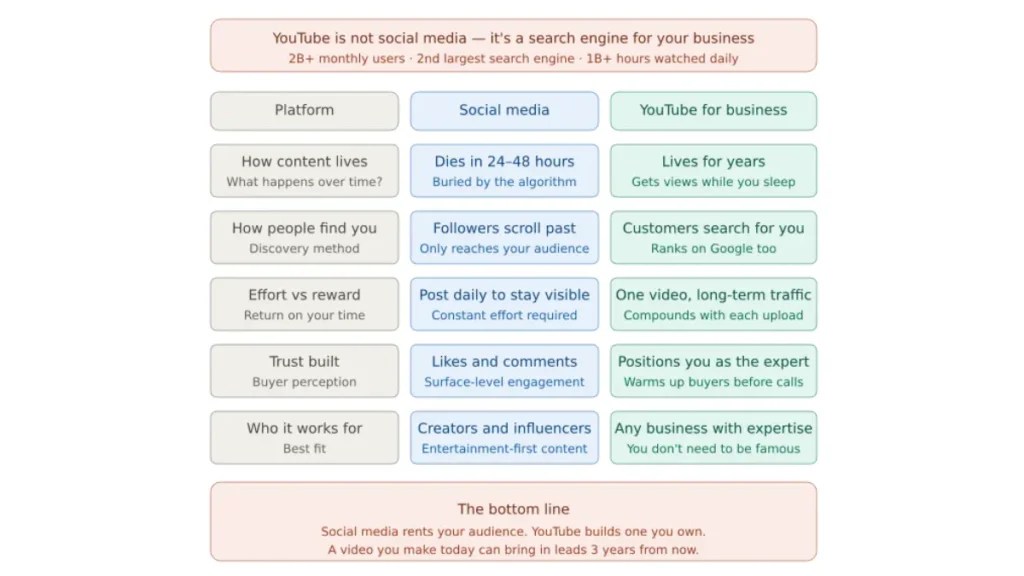
Businesses that use YouTube for business strategically often see higher trust, better engagement, and long-term organic traffic compared to other platforms.
Unlike short-term ads, YouTube content keeps working for you 24/7, bringing in leads and visibility over time.
With the right approach, you’re not just uploading videos—you’re building a long-term digital asset.📈 Think of each video as a piece of content that can bring traffic, leads, and customers for years.
Easy ways to Create a YouTube Channel for Business
1.Create a YouTube Channel by Signing into a Google Account
Go to Youtube.com and sign in using your Google account. You don’t need to create a new one; your existing account works just fine for getting started.
Some people prefer creating a separate account so they can share access with their team without linking personal details. It can also help keep things a bit more organized as you grow.
For businesses, it’s a better idea to create a brand channel. This allows you to use your business name and makes it easier to manage your channel over time.
Learn more about Brand Accounts.
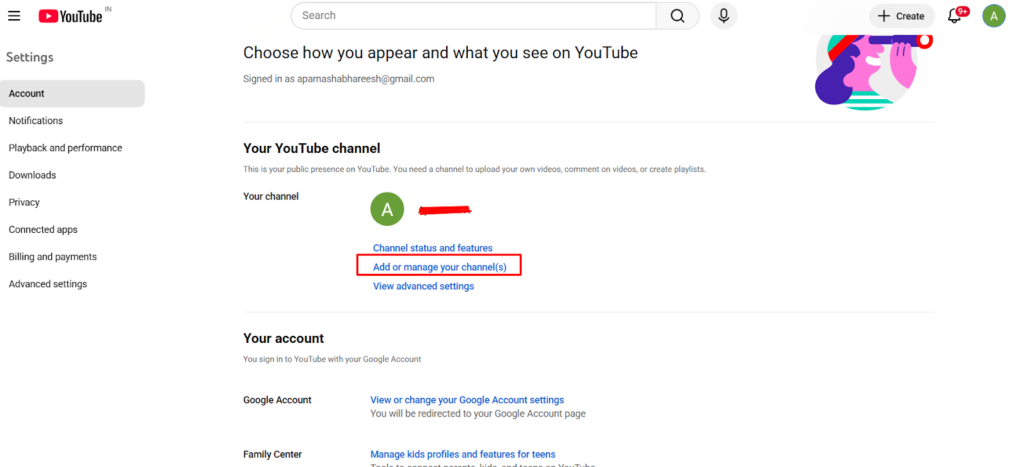
Once you have signed in, click your profile picture > settings.
Go to the account section and select Add or manage channel(s).
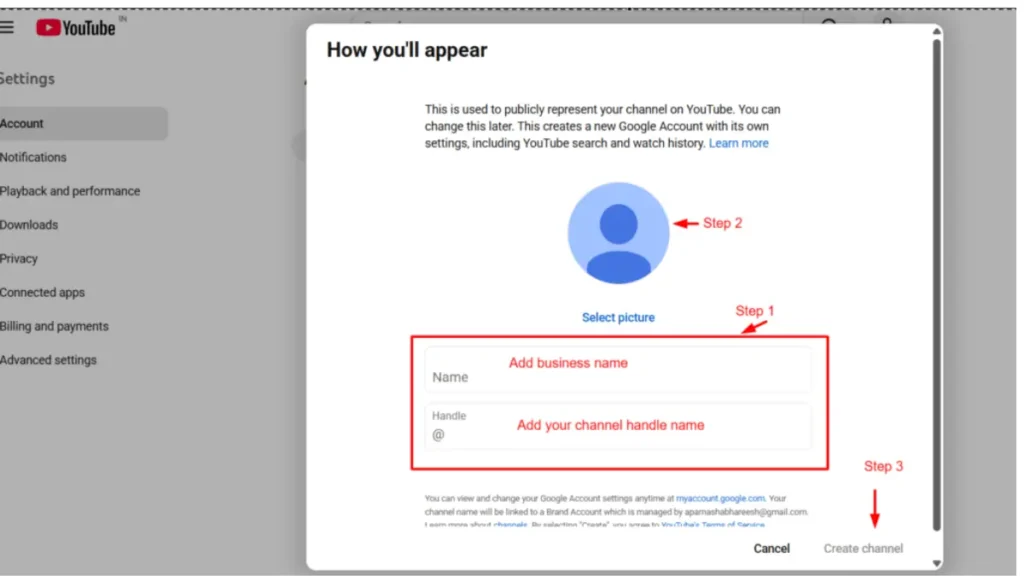
Click “Create a channel.”
After that, choose a profile picture and type in your name and handle name. Click Create channel.
✅ This is the easiest step — but what you do next determines whether your channel grows or gets ignored.
Before you move forward, take a moment to clearly define your target audience and niche, as this plays a crucial role in growing your YouTube for business effectively.
⚠️ Skipping this step is one of the biggest reasons channels fail early.
👉 Learn how to do proper keyword research for beginners:
Tip: In case you don’t have a name, you can use a free YouTube name generator tool.
Once you’ve created your YouTube channel for business, the next step is to build a complete online presence. This means having a simple website and being active on platforms like LinkedIn and Instagram.
When someone discovers your channel, they’ll often want to learn more about your business. They might check your website or look you up on other social platforms to see if you’re credible.
To make sure you don’t lose that interest, have a basic website in place and keep your social profiles updated. It helps build trust and gives your audience a clear next step.
Tip: You can create more than one channel.
If you’re creating a YouTube channel for business, it’s always better to go with a brand channel. This way, you can use your business name and easily add team members later as you grow.
Tip: Before you move ahead, take a moment to secure your account.
Setting up two-step verification in your Google account is a simple step that can help keep your channel safe.
Once that’s done, your business YouTube channel is ready!
🎯 But remember: creating a channel is just the beginning — growth comes from what you post next.
You can access your channel by clicking on your name in the top right corner > switch accounts.
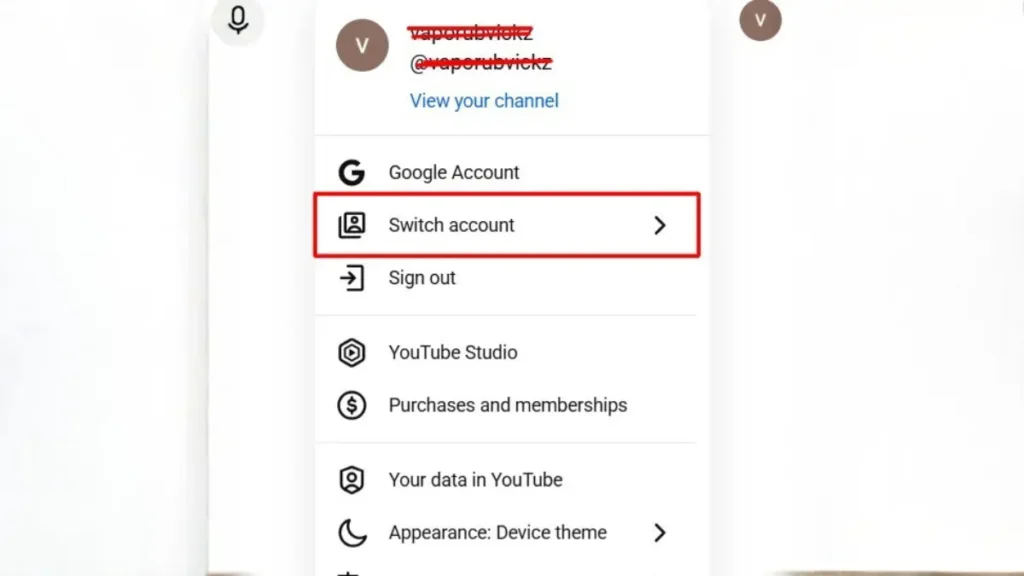
2. Customize your channel
Click on the “Customize Channel” button at the top of your screen.
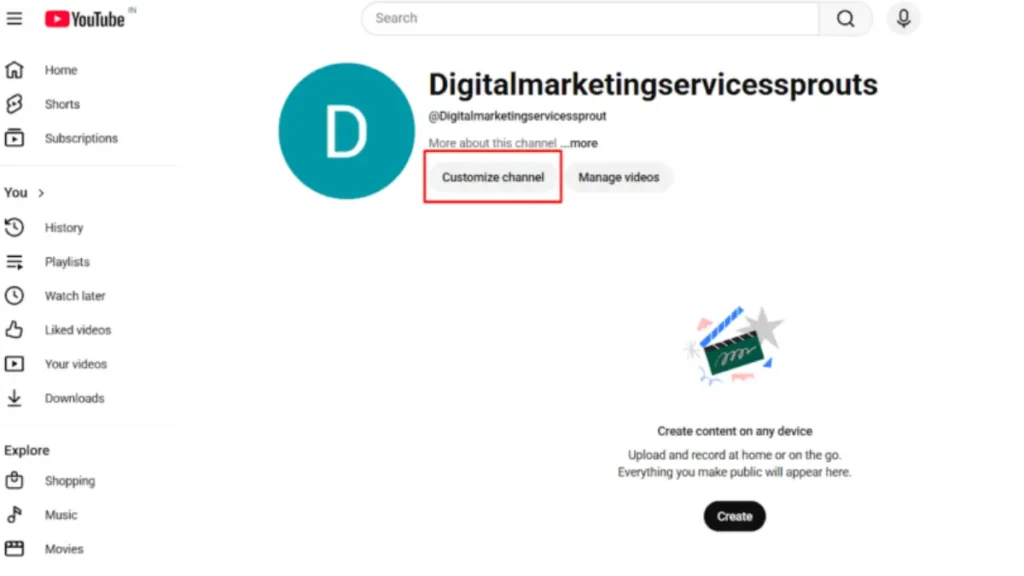
This will take you to YouTube Studio, where you can start setting up your channel.
👀 This is where your channel starts to feel like a real brand — not just an empty account.
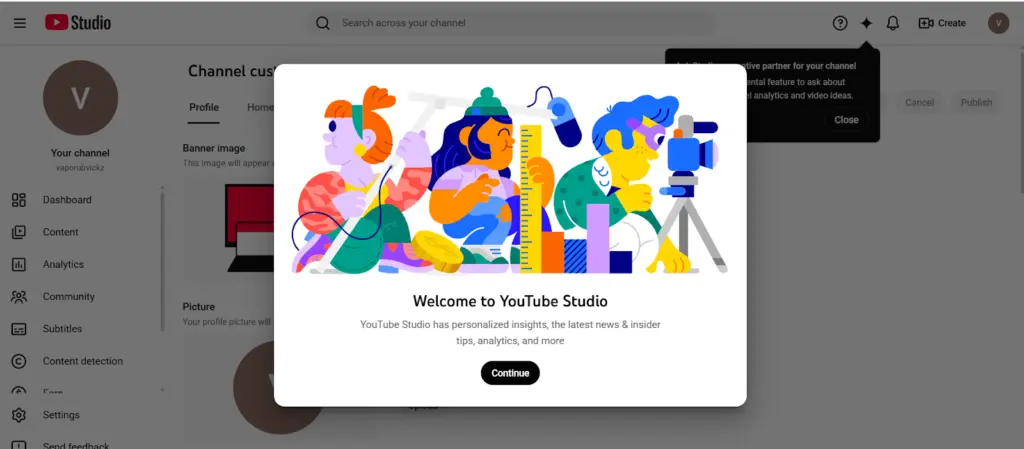
You will see two main sections here: Profile and Home tabs.
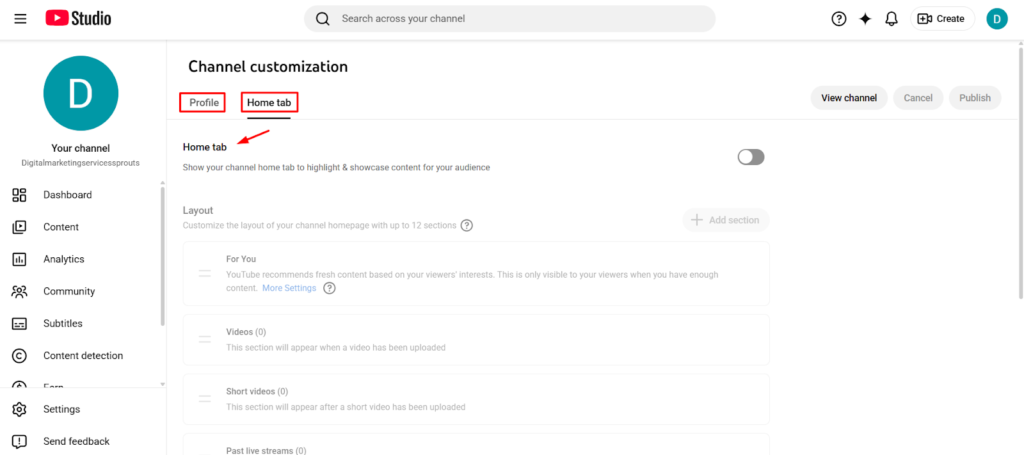
Under the Home tab, you can customize sections like Layout, Branding, and Basic Info. Don’t worry, we’ll take it one step at a time. Let’s start with layout.
The Layout section helps you decide what people see first when they visit your channel.
a: Video Spotlights
This is the first content that shows up on your channel. You can set two types of videos here.
A channel trailer is shown to people who haven’t subscribed yet. This is your chance to quickly tell them what your channel is about and why they should follow you.
🔥 A strong trailer can instantly turn visitors into subscribers — don’t ignore this.
For example, channels like Neil Patel use a short introduction-style video to explain what kind of marketing content they share and who it’s for.
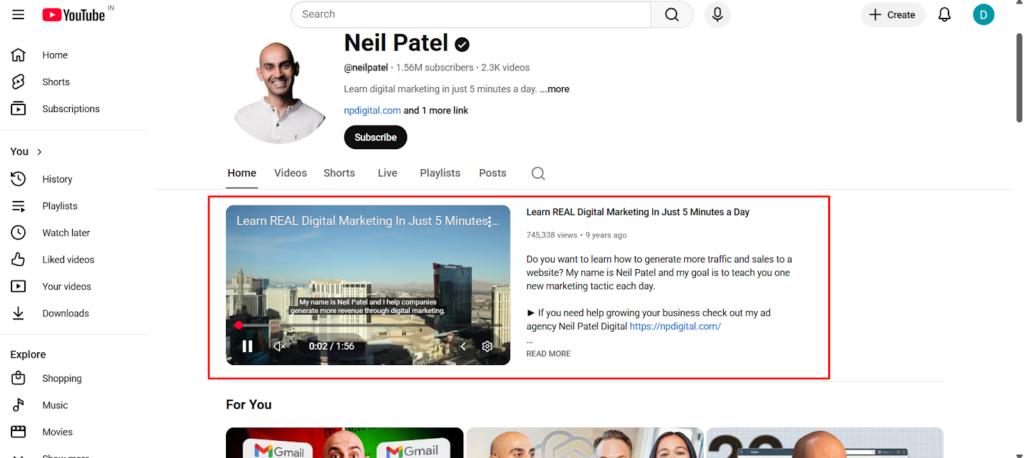
A featured video is shown to your subscribers, but only if they haven’t seen it yet. You can use this to highlight your latest or most important content.
b: Featured Sections
You can add 12 different sections to organize your content and make your channel easier to explore. By default, YouTube shows a Videos section and Shorts, but you can add more based on your content.
For example, a channel like Semrush organizes its content into sections like SEO tutorials, marketing strategies, and webinars. This makes it easier for viewers to find exactly what they’re looking for.
📌 The easier your content is to explore, the longer people stay on your channel.
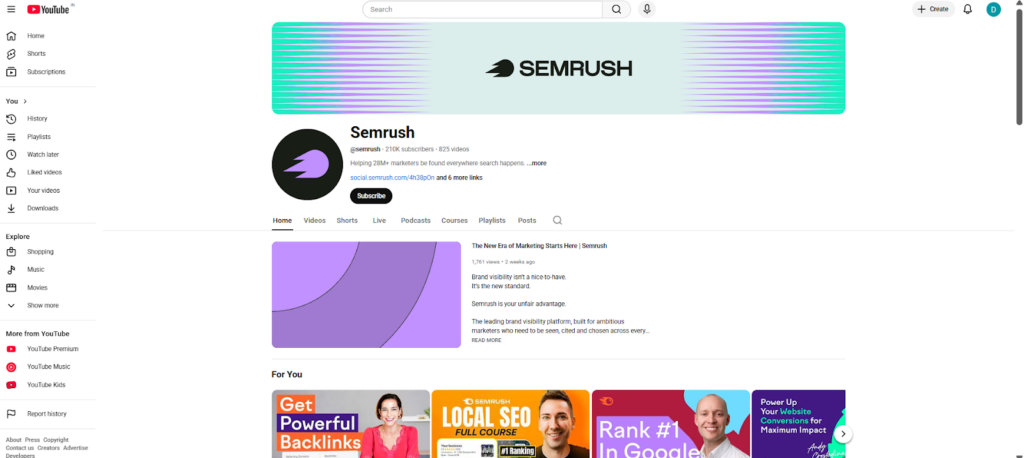
You can add up to 12 sections, so keep it simple and only include what’s useful for your audience.
Once you’ve made these changes, click Publish in the top right corner to save everything.
Pro tip: If you’re just starting out and don’t have many videos yet, you can add a “Featured Channels” section. This helps your channel look more active and also connects you with other creators in your space.
3. Customize branding under profile tab
Set up your YouTube channel for business by adding relevant information. This is what people see when they visit your channel, so keep it simple, clear, and relevant to your business.
💡 First impressions matter — most visitors decide within seconds whether to stay or leave.
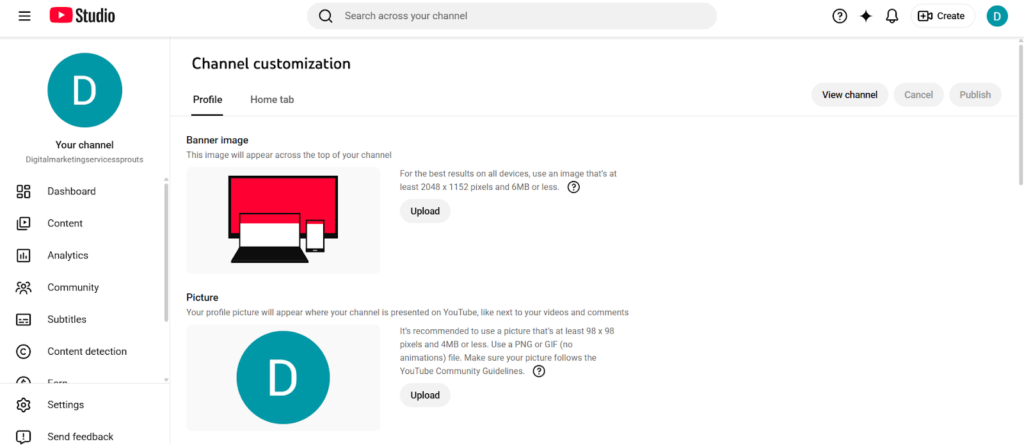
Let’s go one by one.
a: Banner Image
This is the big image at the top of your channel. Think of it like your cover photo; it should quickly tell people what your channel is about.
🎯 A confusing banner can instantly lose a potential subscriber.
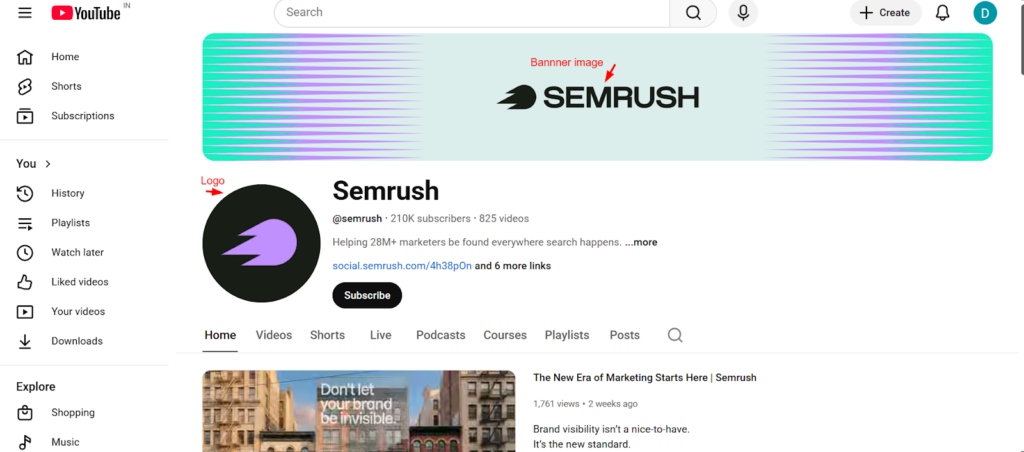
You can add your brand name, what you do, or even a short tagline. Make sure the image is clear and fits well across devices.
👉 You can design banners easily using this guide on how to use Canva:
Tip: For a channel banner, the best dimension should be at least 2048 x 1152 px, but the safe area for mobile and web without cropping is 1546 x 423 px.
b: Profile Picture
Your profile picture appears next to your videos and comments.
For businesses, this is usually your logo. If you’re building a personal brand, you can use a clear headshot. Keep it simple and easy to recognize, even in a small size.
👁️ If people can’t recognize your brand quickly, they won’t remember it later.
Tip: Profile picture dimensions should be 800 x 800 px.
c: Channel Name and Handle
Your channel name should match your business name or something closely related to what you do.
The handle (like @yourname) is your unique identity on YouTube. Keep it simple, easy to type, and consistent with your other social media handles if possible.
d: Description
This is where you explain what your channel is about. Keep it short and clear. Mention:
- what kind of content you post
- who it’s for
- what viewers can expect
Think of it as a quick introduction for someone visiting your channel for the first time.
✍️ This is also a great place to naturally include keywords for better discoverability.
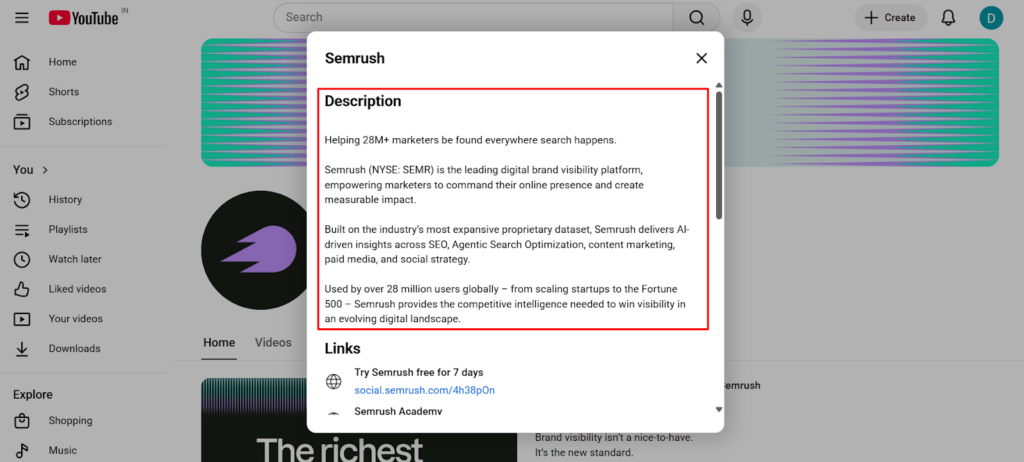
The above is a YouTube description of Semrush for your understanding.
e: Channel URL
This is your channel link. You can share it on your website, social media, or anywhere you want people to find you.
f: Links
You can add links to your website, Instagram, LinkedIn, or any other platform.
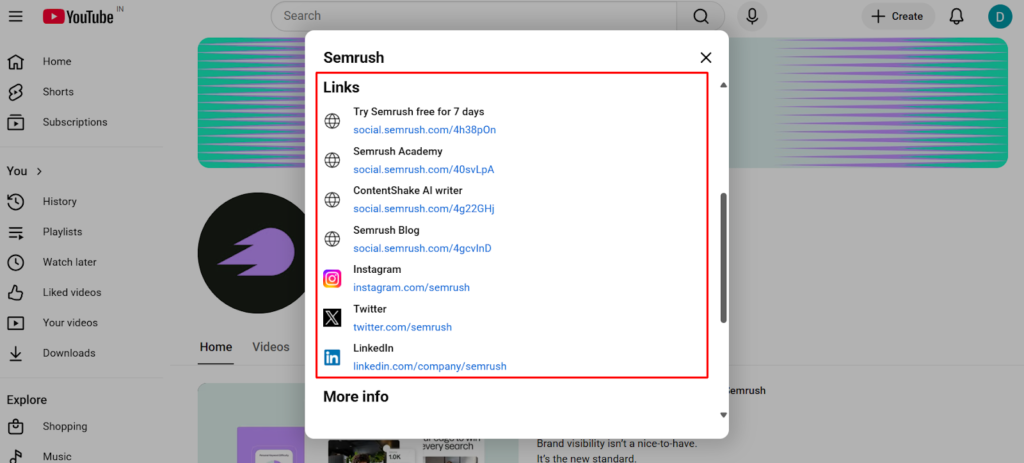
This is helpful because people often want to explore more about your business after watching your videos.
g: Contact Info
Add a business email so brands or potential clients can reach out to you. Keep it professional and separate from your personal email if possible.
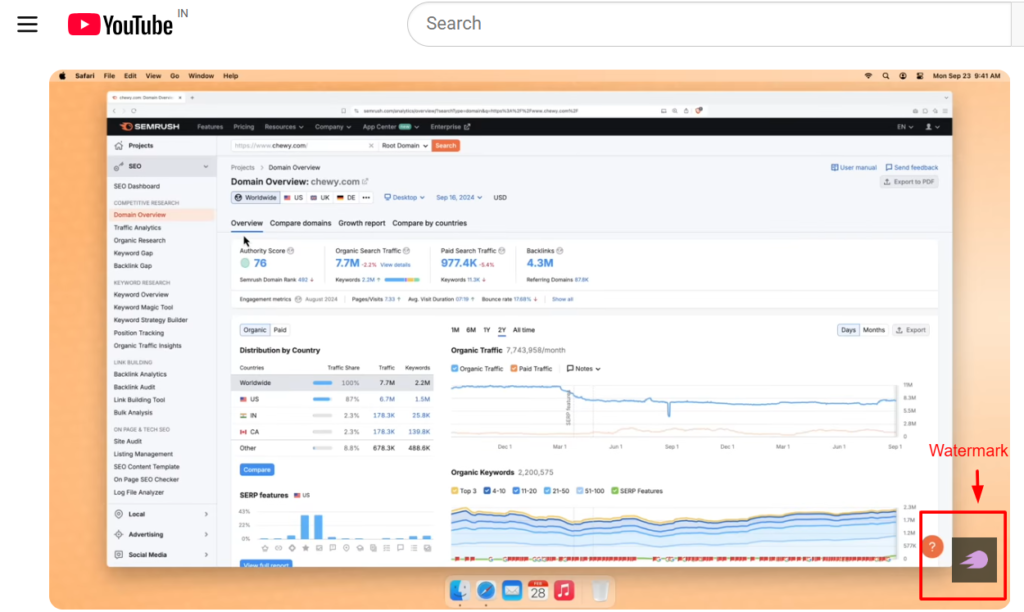
h: Video Watermark
This is a small image (usually your logo) that appears on your videos.
It acts like a subtle branding element and can also encourage people to subscribe to your channel.
Tip: Don’t try to make everything perfect here. Just make sure your profile looks complete and clearly represents your business. You can always update and improve it later.
Once you’re done with all that, pat yourself; your channel is ready.
🚀 Now comes the real game: getting people to actually watch your videos.
Your channel is often the first impression of your brand, so a clean and professional look can instantly build trust with your audience.
A well-branded YouTube for business channel increases the chances of viewers subscribing and engaging with your content.
Key YouTube SEO Basics You Need To Know
Now that you have created a YouTube channel for business, the next important step is to know how to make your YouTube discoverable. This is where YouTube SEO comes in.
🔍 Without SEO, even great videos can stay invisible.
- Research your keywords: Find the words your audience is searching for using tools like TubeBuddy, VidIQ, or Google Trends. Include them naturally in your title, description, and tags.
💡 Don’t guess — use real data to understand what people are searching for.
👉 Start with this beginner SEO guide to rank on Google:
2. Craft a clickable title: Create a clear, engaging title within 60 characters.
3. Write an SEO-friendly YouTube description: Use free tools like Keyword Tool Dominator to generate secondary keywords to include in your description.
4. Design scroll-stopping thumbnails: Use bold visuals, readable text, and a clear subject to create thumbnails. Use free tools like Canva and Adobe to create thumbnails that make people click.
🎯 Your thumbnail is the first thing people notice — it can make or break your video.
Avoid common mistakes with this top blog writing mistakes guide:
5. Add relevant tags and organize videos as playlists: Mix broad and specific tags and group related videos to improve watch time.
6. Use captions, subtitles, cards & end screens: Add captions and subtitles to improve accessibility and give YouTube more context. Use cards and end screens to link related videos, playlists, or your website to keep viewers engaged longer.
The first 5–10 seconds of your video are critical, so start with a strong hook that immediately grabs attention and makes viewers want to continue watching.
⚠️ If you lose viewers here, they rarely come back.
A simple title formula you can follow is: “How to [Achieve Result] + [Keyword]” to improve both CTR and search visibility.
Thumbnails should trigger curiosity using contrast, emotions, and minimal text to make your videos stand out in crowded feeds.
Common Mistakes To Avoid When Creating a YouTube Channel For Business
One of the most common mistakes beginners make as soon as they start a YouTube channel for business is uploading random videos.
❌ Random content = random results (and usually no growth).
👉 Here are common digital marketing questions beginners ask:
Instead, think about who you want to reach and post relevant videos your audience will like.
- Not making your channel look professional is another major red flag. A blank banner or no profile picture can make your channel look unfinished.
2. Don’t only sell your products. Of course it is your account, but if you post videos of just your product, people won’t stay. Share tips, tutorials, trends, etc. People love channels that teach, entertain, or solve.
👉 People subscribe for value, not constant selling.
3. Use SEO and pay attention to your comments. Reply to comments and questions so viewers feel seen and engaged. Optimizing your videos helps new people discover your channel faster.
Another hidden mistake is ignoring audience retention—if people don’t watch your videos till the end, your growth will slow down significantly.
Lack of niche clarity and weak video hooks can silently kill your channel before it even starts gaining traction.
How to Grow Your YouTube Channel for Business in a Simple Way?
Growing a YouTube channel for your business doesn’t have to be complicated.
Use clear, descriptive titles and thumbnails that catch the eye, and make sure the first few seconds of your video hook viewers so they keep watching.
Consistency is key, so pick a posting schedule you can realistically maintain. Engage with your viewers by replying to comments and asking them to subscribe, creating a loyal community around your brand.
Finally, repurpose longer videos into Shorts and share them on social media to expand your reach, all without needing fancy equipment.
👉 Learn more with these Instagram marketing tips for small business:
Tip: If you are starting out, don’t waste time and money on YouTube ads. Keep posting videos and build a good community first.
Congrats, you have created your first YouTube channel for business. That’s all you need to know!
💬 Quick question: what’s stopping you from posting your first video today?
To make content creation easier, define 2–3 content pillars (like tutorials, tips, and case studies) and stick to them consistently.
This structured approach helps you grow your YouTube for business faster without constantly worrying about new ideas.
If you want to start a YouTube channel but feel stuck or want faster results, having the right strategy can save you months of trial and error.
Instead of guessing what works, focus on building a system that consistently attracts, engages, and converts your audience.
Take action today and start building your YouTube for business the right way.
🚀 Your first video doesn’t need to be perfect — it just needs to be uploaded.
📌 Most Read on Digistir360:
👉 Complete Digital Marketing Guide for Beginners
👉 Free Marketing Tactics for Small Businesses (Proven Strategies)
FAQs
Is a business YouTube channel free?
Yes, creating a YouTube channel for business is free.
What type of YouTube videos get viewed most?
The most viewed YouTube videos are typically comedy, music, gaming, how-to, and educational content because they entertain, inform, or teach something valuable.
Can I start making money from YouTube?
Yes, you can. To earn from YouTube, join the YouTube Partner Program and start monetizing your content.
If this guide helped, read this next:
👉 Beginner: Google Analytics Tutorial for Beginners (Step-by-Step Guide)
👉 Advanced: Content Ideas for Instagram to Grow Your Business Fast